
Komunikacja Client-Server po http pomiędzy dwoma kontrolerami ESP, może odbywać się bez konieczności łączenia ich z siecią bezprzewodową.
Jeden z kontrolerów musi działać jako punkt dostępu (Serwer). Drugi kontroler (Klient) będzie wysyłać żądania http w celu uzyskania danych.
Komunikacja Client-Server
Serwer posiada własną sieć bezprzewodową, nasłuchuje żądań HTML. W przypadku otrzymania żądania np. "192.167.4.1/t" pobiera dane z czujnika i wysyła odczyt.
server.on("/t", HTTP_GET, [](AsyncWebServerRequest *request){
    request->send_P(200, "text/plain", readTemperature().c_str());
  });
Klient pobiera dane od serwera i wyświetla je na wyświetlaczu 16X2 wykorzystującym protokół I2C.
mVolt = httpGETRequest("http://192.168.4.1/v");
sensor = httpGETRequest("http://192.168.4.1/t");
Schemat
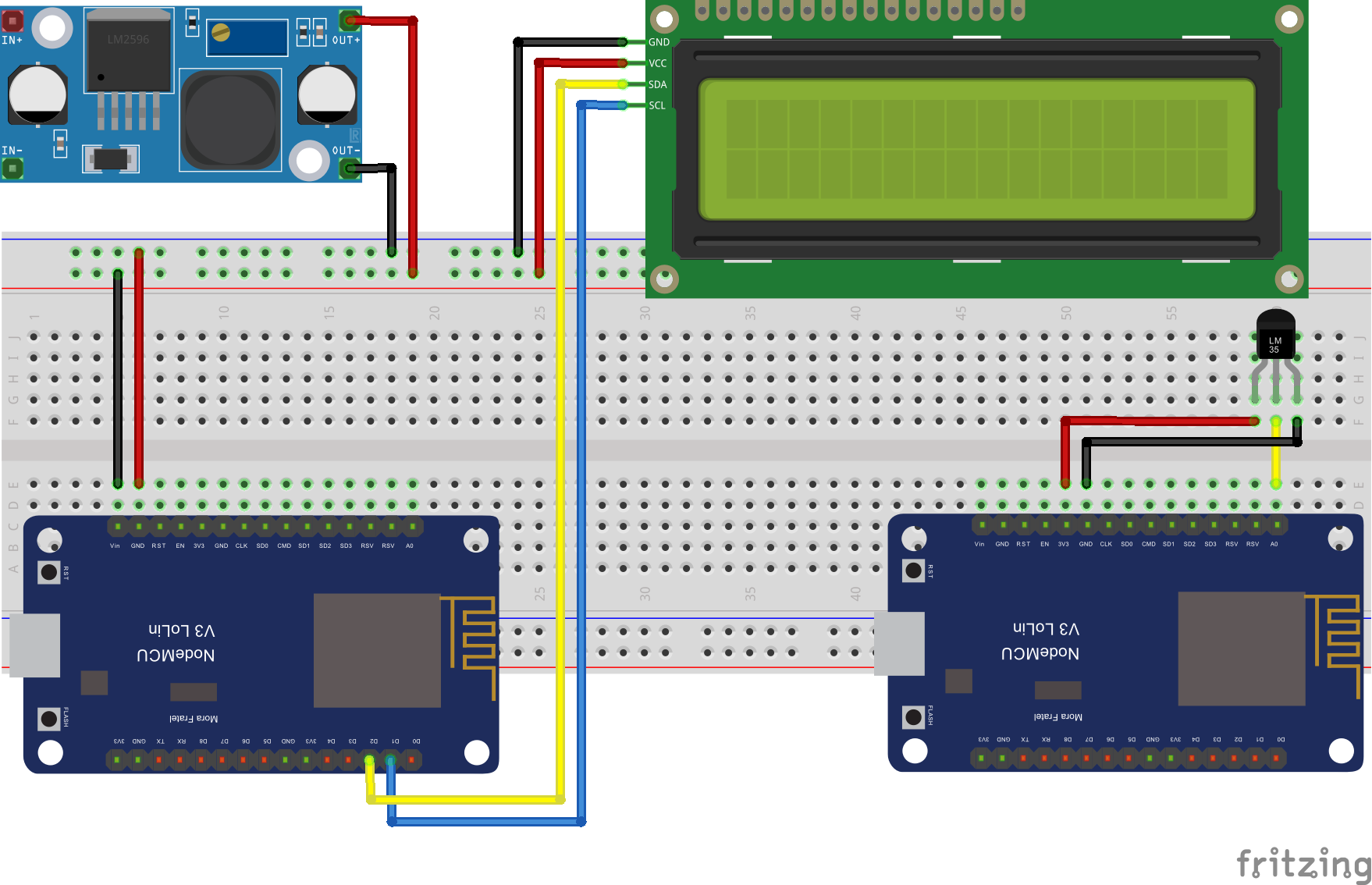
Kod serwer
#include <ESP8266WiFi.h>
#include "ESPAsyncWebServer.h"
#define analogtPin A0

String ssid     = "ArduinoTestWiFi";
String password = "12345678";

AsyncWebServer server(80);

String readTemperature() {
  int analogValue = analogRead(analogtPin);// Odczyt napięcia pinu analogowego
  float millivolts = (analogValue/1024.0) * 3300; // Uzyskanie wartości w mV
  float celsius = millivolts/10; // Wzrost temperatury o 1 stopień powoduje wzrost napięcia o 10mV.
  Serial.print("C =   ");
  Serial.println(celsius);
  return String(celsius);
}

String readVolt() {
  int analogValue = analogRead(analogtPin);
  return String(analogValue);
}

String Sensor() {
  return String("LM35");
}

void setup(){
  Serial.begin(9600);

  WiFi.softAP(ssid, password); // Stworzenie punktu dostępu

  IPAddress IP = WiFi.softAPIP();
  Serial.print("Adres IP: ");
  Serial.println(IP);

  server.on("/t", HTTP_GET, [](AsyncWebServerRequest *request){
    request->send_P(200, "text/plain", readTemperature().c_str()); // Wysłanie danych temperatury
  });
    server.on("/v", HTTP_GET, [](AsyncWebServerRequest *request){
    request->send_P(200, "text/plain", readVolt().c_str()); // Wysłanie danych napięcia sensora LM35
  });

  server.begin();
}

void loop(){

}
Kod klient
#include <ESP8266WiFi.h>
#include <ESP8266HTTPClient.h>
#include <WiFiClient.h>
#include <ESP8266WiFiMulti.h>
#include <Wire.h>
#include <LiquidCrystal_I2C.h>

ESP8266WiFiMulti WiFiMulti;

LiquidCrystal_I2C lcd(0x27, 2, 1, 0, 4, 5, 6, 7, 3, POSITIVE);  // Ustawienie adresu ukladu na 0x27

const char* ssid = "ArduinoTestWiFi";
const char* password = "12345678";

String temperature;
String mVolt;
String sensor;

unsigned long prevMillis = 0;
const long refresh = 2000;

void setup() {
  Serial.begin(9600);
  Serial.println();

  lcd.begin(16,2); //Deklarowanie rozmiaru wyświetlacza
  lcd.backlight();
  lcd.setCursor(0,0); //Ustawuenie kursora na znaku początkowym
  lcd.print("Client ESP8266");//Wypisanie tekstu
  lcd.setCursor(0,1);
  lcd.print("SENSOR LM-35");
  delay(1000);
  lcd.clear();
  lcd.setCursor(0,0);
  lcd.print("Wifi Start");
  WiFi.mode(WIFI_STA);
  WiFiMulti.addAP(ssid, password);
  while((WiFiMulti.run() == WL_CONNECTED)) {
    delay(500);
  }
}

void loop() {
  unsigned long Millis = millis();

  if(Millis - prevMillis >= refresh) {
    if ((WiFiMulti.run() == WL_CONNECTED)) {
      temperature = httpGETRequest("http://192.168.4.1/t");
      mVolt = httpGETRequest("http://192.168.4.1/v");
      sensor = httpGETRequest("http://192.168.4.1/test");
      lcd.clear();
      lcd.setCursor(0,0);
      lcd.print("Temp = ");
      lcd.print(temperature);
      lcd.print(" C");

      lcd.setCursor(0,1);
      lcd.print("Volt = ");
      lcd.print(mVolt);
      lcd.print(" mV");

      prevMillis = Millis;
    }
    else {
      Serial.println("WiFi Disconnected");
    }
  }
}

String httpGETRequest(const char* serverName) {
  WiFiClient client;
  HTTPClient http;

  http.begin(client, serverName);

  int htmlAnswer = http.GET();

  String payload = "--.--";

  if (htmlAnswer>0) {
    Serial.print("HTTP Response code: ");
    Serial.println(htmlAnswer);
    payload = http.getString();
  }
  else {
    Serial.println(htmlAnswer);
  }

  http.end();
  return payload;
}